
Floating origin in Orbital Decay
How we keep ship geometry stable while simulating motion across the solar system.
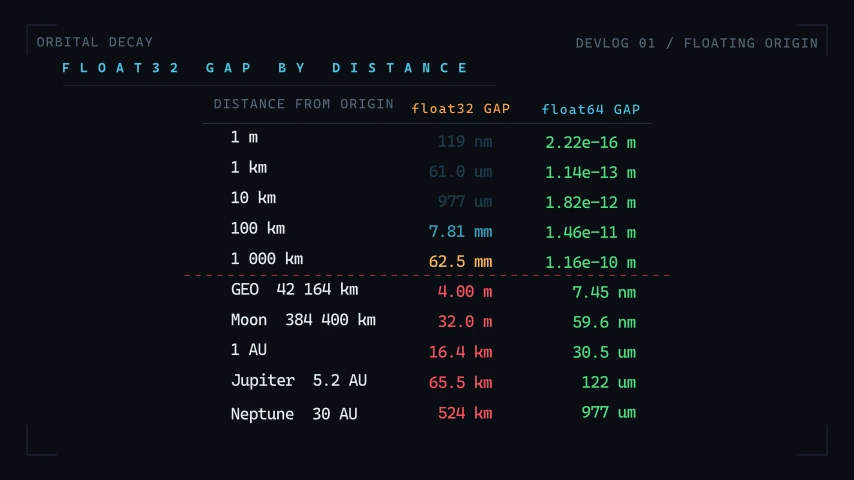
We need to draw small parts of a spacecraft while simulating distances across the solar system. A 100 m ship needs much more detail than a distant planet, but both have to occupy the same scene.
Unity uses 32 bit floating point numbers for positions. The gap between consecutive values grows as the coordinate gets larger. At a coordinate of 1 AU, that gap is about 16.4 km. We can't place individual parts of a ship accurately with numbers spaced that far apart.
Keeping the camera at the origin
In Orbital Decay, the simulation stores positions in double precision. For rendering, we subtract the camera's position from each object's position before converting to a regular float.
That keeps the camera at the origin and nearby geometry at small coordinates, where 32 bit floats still have enough precision. Moving the camera through space means moving the rendered world around it.
The diagram shows how simulation coordinates and rendering coordinates are kept separate. The orbital simulation continues to use the original positions.
Drawing distant objects
Some objects are still too far from the camera to render directly. Beyond a chosen distance C, we draw them between C and 2C.
Bringing an object closer would make it look larger, so we also shrink it by the same factor. If we draw it 2 times closer, we make it 2 times smaller. Its apparent size stays the same.